What's different about ChatGPT vs. Claude
Claude Desktop, Cursor, and VS Code all connect using a connector URL with your API key baked in (?apiKey=fmk_...) — see the Getting Started guide. ChatGPT works differently: Finmagine is a listed app in OpenAI's app directory, so there's no URL to copy and no API key to paste. You connect entirely from inside ChatGPT, and it always uses a real OAuth login — the same login/consent screen described in the Connected Apps & Auth Types guide.
The one-line version: If you're on ChatGPT, you never touch an API key at all — you log into Finmagine once, on Finmagine's own site, and approve access.
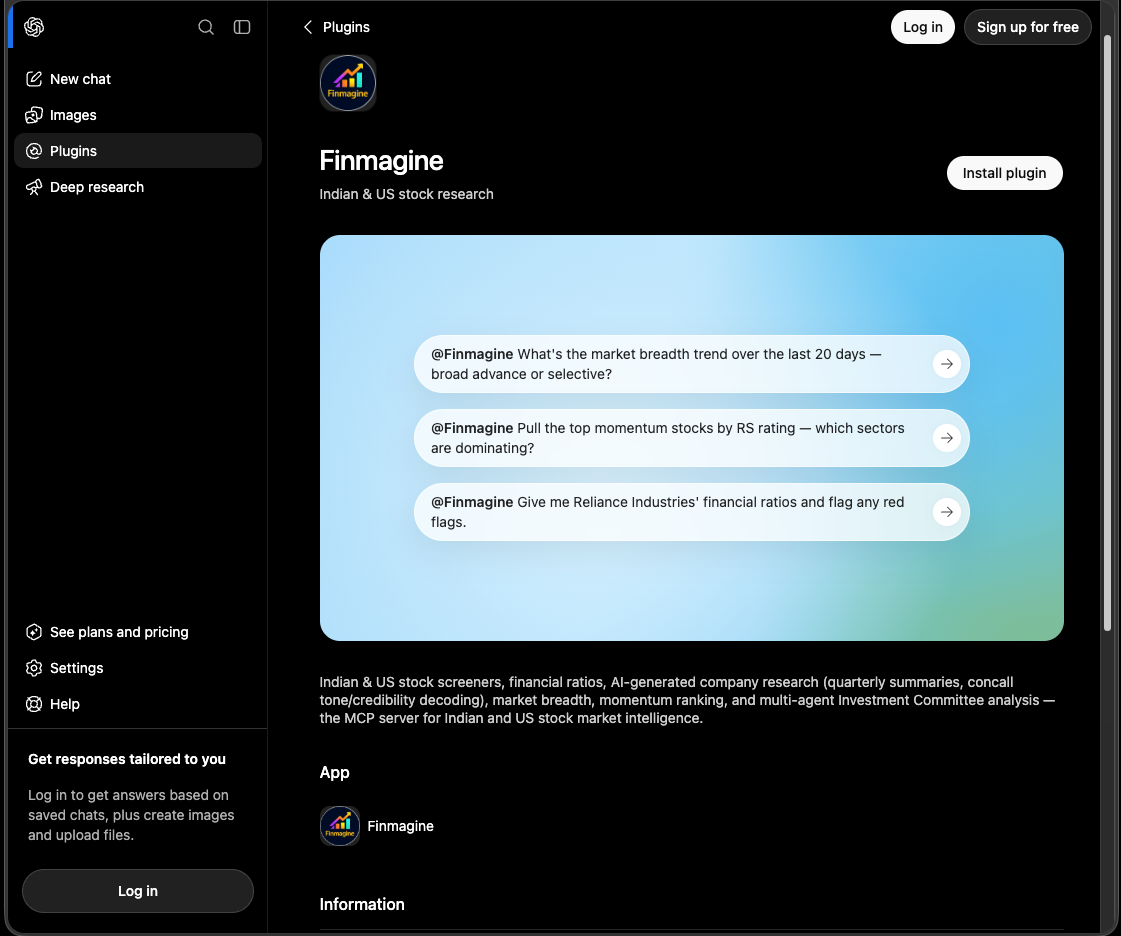
Finmagine's public listing in ChatGPT — visible even logged out, with the same starter prompts as above.
Connect in three steps
Open Finmagine's ChatGPT listing directly → — or follow the three steps below to find it from inside ChatGPT.
Step 1
Find Finmagine in ChatGPT
Inside ChatGPT, search for "Finmagine" in the apps/connectors directory — or use the direct link above.
Step 2
Click Connect
ChatGPT redirects you to Finmagine's login and consent screen — no manual URL or key entry.
Step 3
Log in and approve
Sign into your Finmagine account and approve the requested access. You're connected.

The real consent screen — every requested scope is spelled out in plain language before you approve anything.
Once connected, the app shows up on your Connected Apps page labeled "ChatGPT" — with a Disconnect button if you ever want to revoke access.

Every ChatGPT connection shows up on Connected Apps automatically, labeled "ChatGPT".
What tier does my ChatGPT connection get?
Your ChatGPT connection uses your existing Finmagine account automatically — if you already have a standalone API Pro or API Max subscription, or a Professional web plan, the connection provisions at that tier from the start. If not, it starts on the free tier, same limits as any other free API key. Upgrading later — through the developer portal or your account subscription — applies automatically to your ChatGPT connection too, with no need to reconnect.
Premium ≠ API Pro. If you're on Finmagine's
Premium website plan (not Professional), your ChatGPT connection does
not automatically get API-Pro-level access — Premium and API Pro are separate products on separate axes (website features vs. programmatic/agent access). Tools that require Pro will show as gated even though you're a paying subscriber. Professional web subscribers already pass the Pro gate at no extra cost; Premium subscribers would need a standalone
API Pro or Max subscription. Full breakdown:
The Web-Subscriber Bonus Path →
Provider keys stay out of ChatGPT entirely. Finmagine never asks ChatGPT for your saved Groq/DeepSeek/Gemini/etc. keys, and ChatGPT can't save one on your behalf either. Manage those separately on
AI Keys — if a tool needs one you haven't saved, it'll point you back there.
Starter prompts
Try these once connected:
"@Finmagine What's the market breadth trend for Indian stocks over the last 20 days — broad advance or selective market?"
"@Finmagine Pull the top momentum stocks by RS rating — which sectors are dominating?"
"@Finmagine Screen for profitable mid-cap Indian stocks with low debt and strong momentum."
"@Finmagine Give me Reliance Industries' AI-generated quarterly summary and concall decoder — any red flags in management's tone?"
"@Finmagine Which AI providers do I have connected?"
Type @Finmagine first. That's how you tell ChatGPT to actually call Finmagine's tools for this message — without it, ChatGPT may just answer from its own training data instead of pulling live data.
The last one checks your saved BYO provider-key status without ever exposing the key itself — useful before asking ChatGPT to run an Investment Committee analysis, which needs one connected.
Quick reference
Do I need a Finmagine API key to use ChatGPT?
No. The OAuth login/consent flow replaces the API key entirely for ChatGPT connections. API keys are only used for the URL-based connector setup (Claude Desktop, Cursor, VS Code).
Why does it show up as "ChatGPT" and not "Finmagine" on my account?
Can I disconnect it later?
Yes — click Disconnect on
Connected Apps, or remove the connector from ChatGPT's own settings. Either one revokes access immediately.
Ready to Analyse Indian Stocks Like a Pro?
Finmagine gives you 30+ computed financial ratios, sector benchmarks, FII/DII flows, the Finmagine Score, and AI-powered analysis — all in one place.