✨ AI Advisor

18 Expert Prompt Templates · Intelligence Block · Platform Guide · Stage 2 Cross-Product Flow

← Companies Hub ← Scorecard Guide

Following along? Open the live page

Finmagine — free to explore • premium for full access • no app needed

Open Finmagine →
Published April 7, 2026  ·  Companies Tab Series  ·  12 min read
✨ AI Advisor — Learning Hub
18 expert templates · Intelligence Block · Platform selection · Richer context auto-injection

After reading this guide you will be able to:

  • Understand what the AI Advisor tab is — and what it is not
  • Know all 18 templates, what each does, and which AI platform to use for each
  • Understand the Intelligence Block and why it makes Web App prompts sharper than the Chrome extension
  • Use the Stage 2 → Growth Triggers cross-product flow
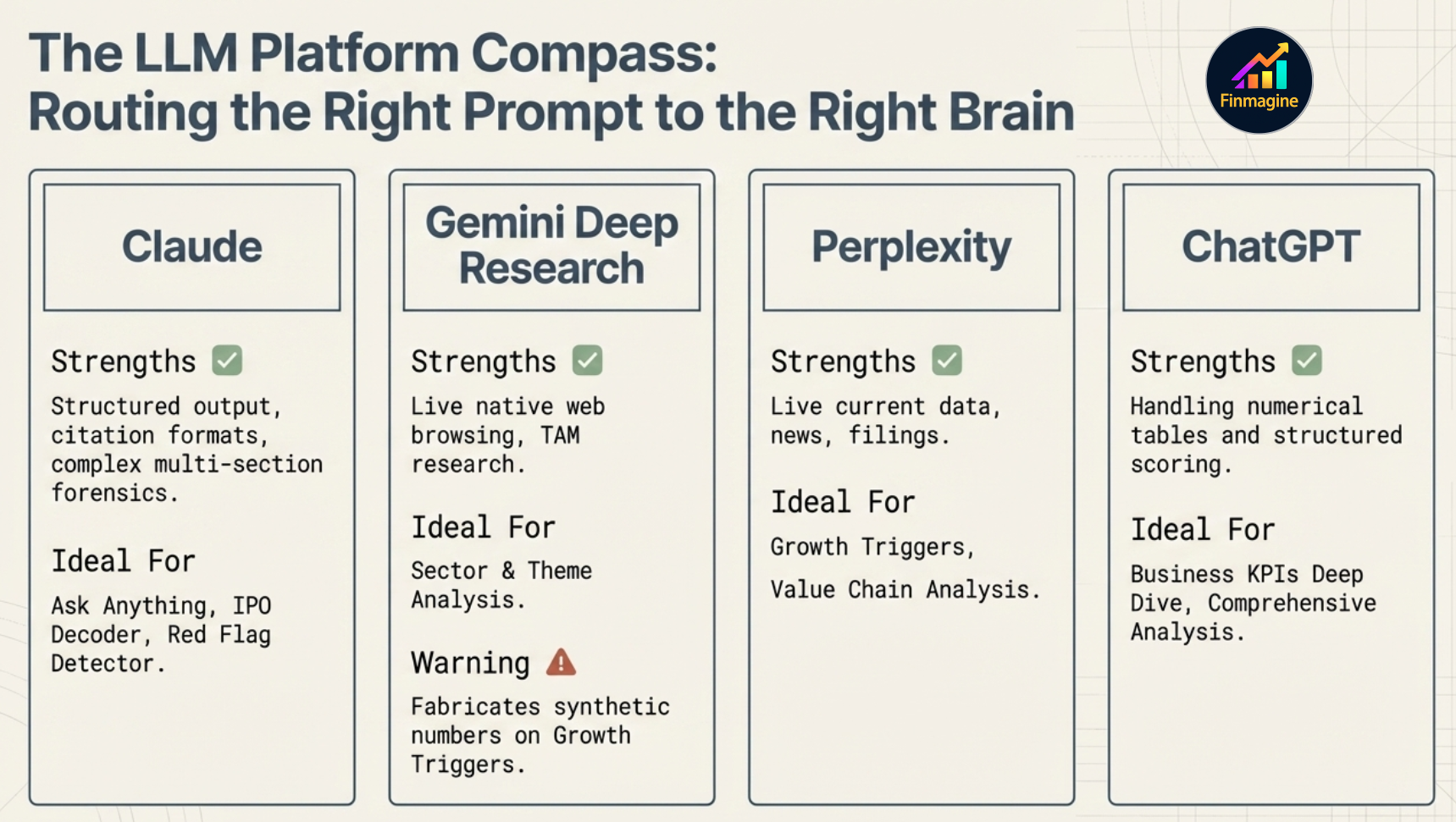
  • Know when to use Claude, Gemini, Perplexity, or ChatGPT for each template
  • Understand the new Expert Analysis templates — IPO Decoder and Red Flag Detector
Finmagine AI Platform Compass — routing the right prompt to the right AI platform
The AI Platform Compass — which templates work best on Claude, Gemini Deep Research, Perplexity, and ChatGPT

Why AI Stock Analysis Fails (And How to Fix It Like a Pro)

Why most investors get generic, useless output from AI — and exactly how the structured prompt library, Intelligence Block, and platform routing solve it at a fundamental level.

🎧 The AI Advisor Deep Dive

A deep-dive conversation on the Finmagine AI Advisor — covering the Intelligence Block, template selection by use case, platform recommendations, the Stage 2 cross-product flow, and forensic document analysis with IPO Decoder and Red Flag Detector.

Approx. 15–20 minutes · Financial education podcast · No investment advice

What Is the AI Advisor Tab?

The AI Advisor tab is a structured prompt library — 18 expert templates that turn the company data on your screen into a precise, context-rich brief ready to paste into Claude, ChatGPT, Gemini, or Perplexity. It is not a chatbot embedded in the page. It is a research accelerator: it does the hard work of framing the right question with the right context, so the AI you use delivers analysis that is specific, structured, and actionable rather than generic and meandering.
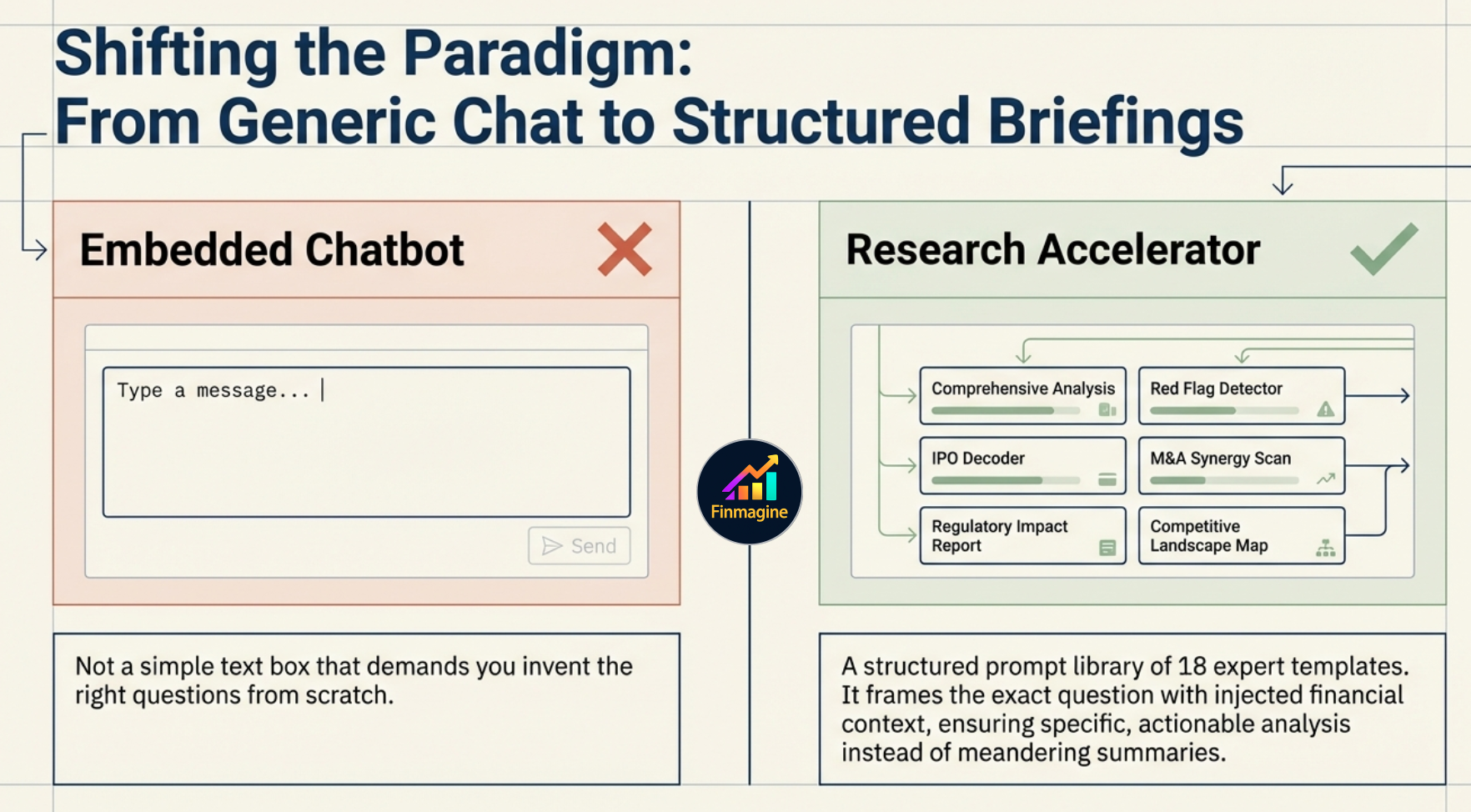
The real problem isn't the AI — it's how you use it. Most investors paste a wall of financial data, type "analyze this stock," and get a polished but useless textbook summary. Revenue is up, margins are stable, investors should carefully monitor market conditions. The AI didn't fail — it had nothing to work with. An unstructured question with raw data forces the model to be a data scraper, financial modeller, qualitative analyst, and portfolio manager simultaneously. That's exactly the wrong way to use it.
The Finmagine AI Advisor: An Analyst's Command Center — 18 Expert Templates, Pre-Computed Intelligence, A Highly Structured Reasoning Engine for Fundamental Research
18 Expert Templates · Pre-Computed Intelligence · A Highly Structured Reasoning Engine for Fundamental Research
Shifting the Paradigm: From Generic Chat (Embedded Chatbot) to Structured Briefings (Research Accelerator) — 18 expert templates vs a simple text box
Not a chatbot that demands you invent the right questions from scratch. A structured prompt library of 18 expert templates that frames the exact question with injected financial context.
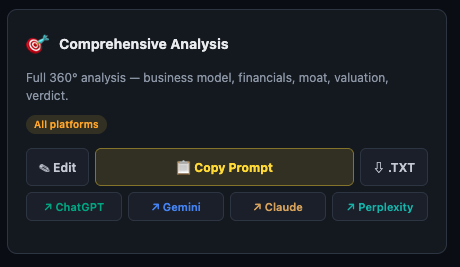
AI Advisor template card — Comprehensive Analysis showing Copy Prompt button and platform links
Each template card shows the purpose, best platform tag, Copy Prompt button, .TXT download, and direct links to open each AI platform

Each template card shows:

Premium-only feature. The AI Advisor tab is visible only to Premium subscribers. It is one of the highest-leverage features on the platform — 18 templates that would take hours to write yourself, pre-loaded with the company's financial context.

The Intelligence Block — What Happens Before Your Prompt

This is the most important thing to understand about the Premium Web App AI Advisor. Before any template reaches the AI, Finmagine prepends an Intelligence Block — a structured context layer computed from the company's financial data. You do not write this. You do not copy it. It is automatically attached to every prompt.
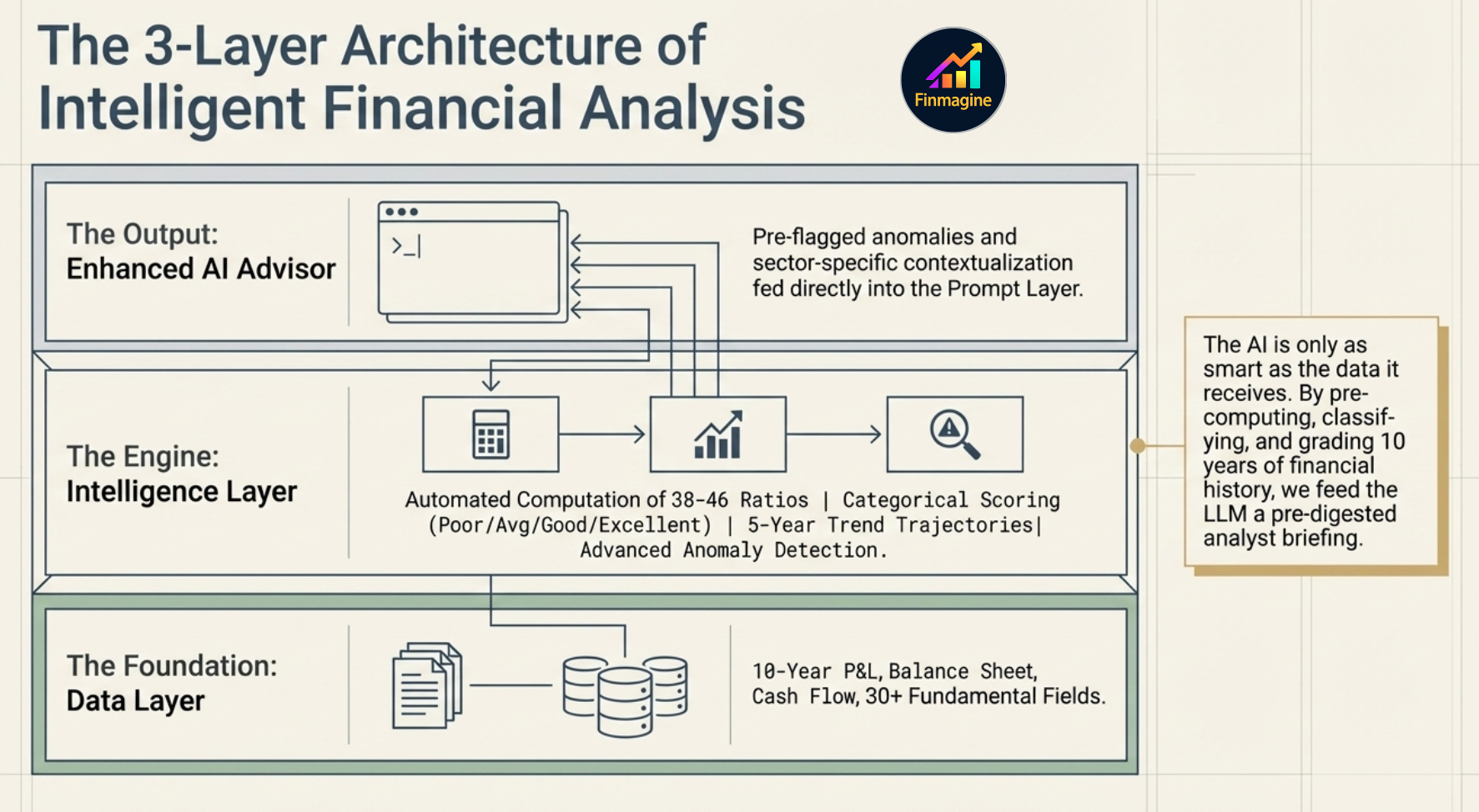

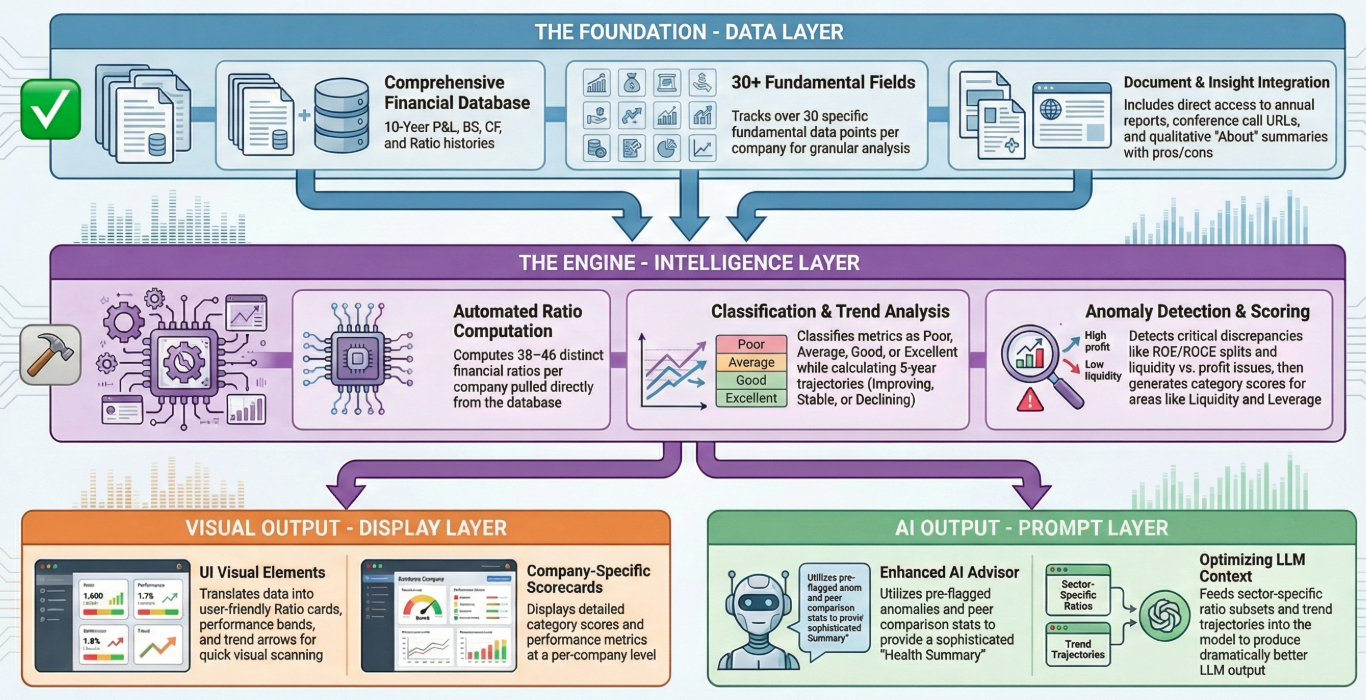
The 3-Layer Architecture of Intelligent Financial Analysis — Data Layer (10-year P&L, Balance Sheet, Cash Flow), Intelligence Layer (38-46 ratios, categorical scoring, 5-year trend trajectories, advanced anomaly detection), Output Layer (Enhanced AI Advisor)
The three-layer architecture: the Data Layer (10-year financial history) feeds the Intelligence Layer (ratio computation, classification, trend analysis, anomaly detection), which then feeds the AI Advisor prompt. The AI is only as smart as the data it receives — this is the briefing it gets.
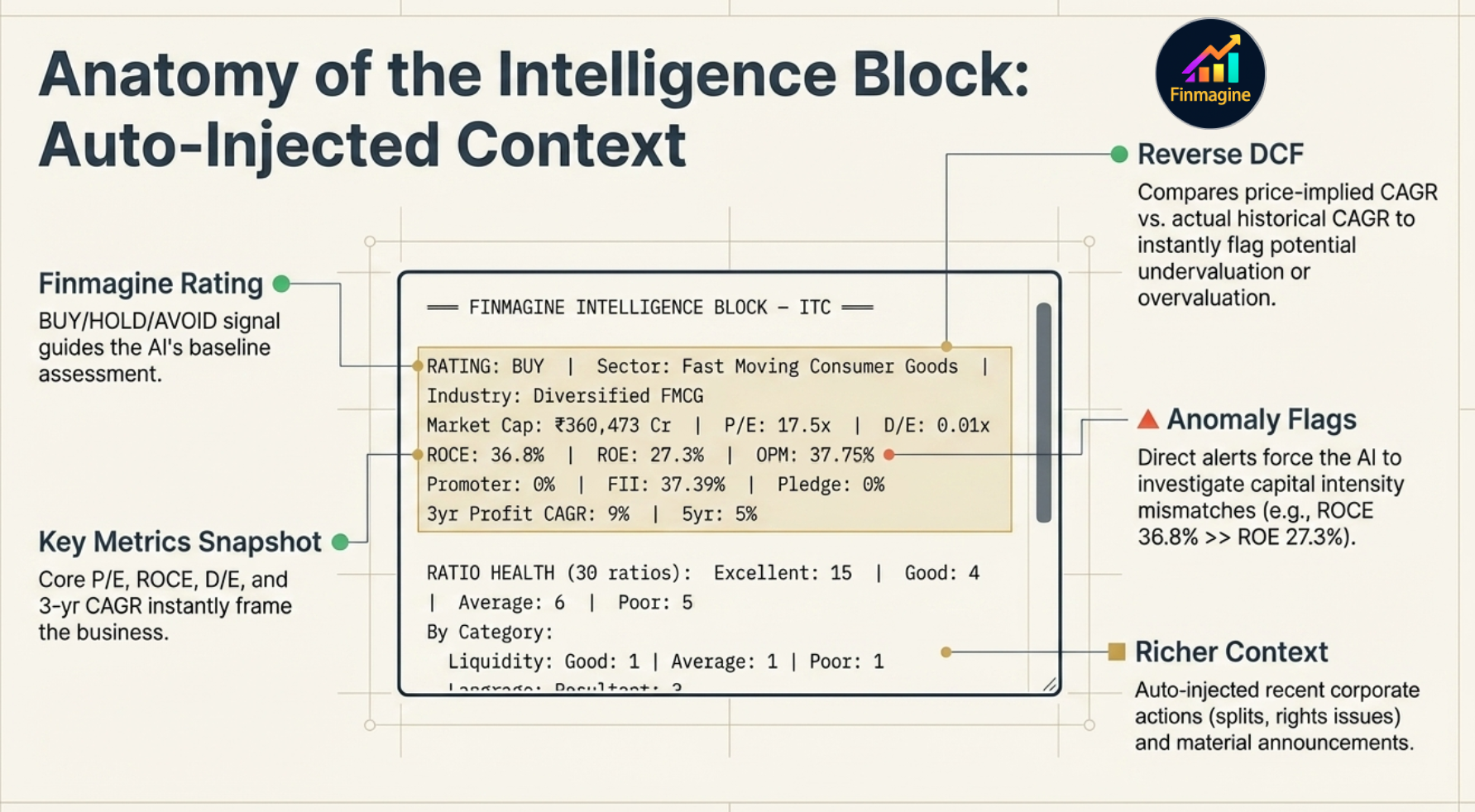
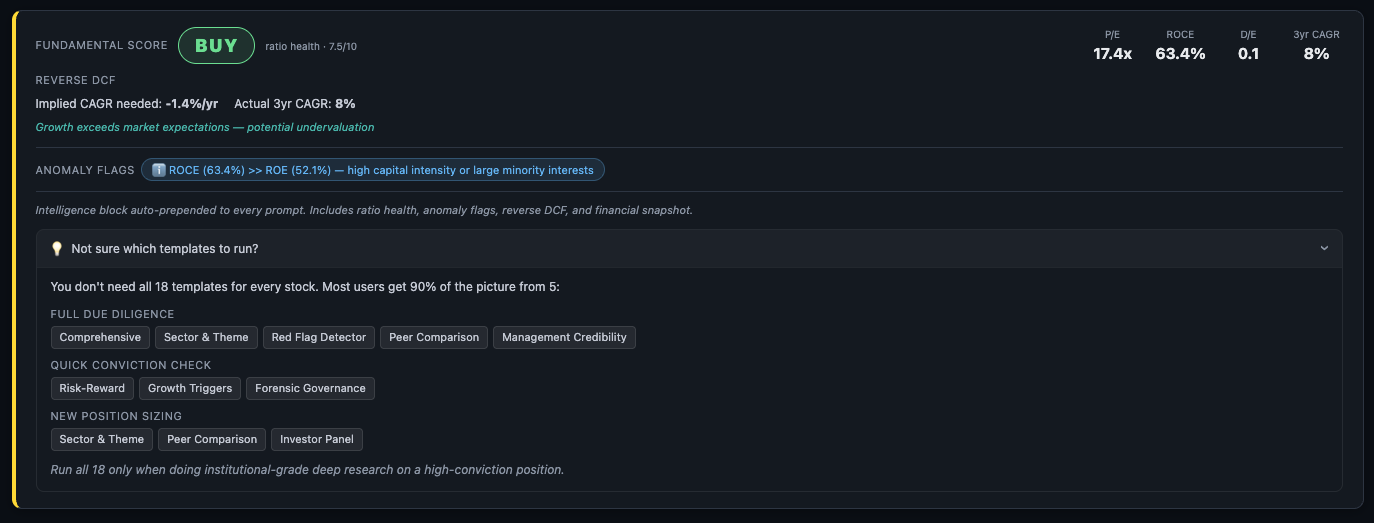
Intelligence Block showing Finmagine Rating BUY, Reverse DCF implied vs actual CAGR, Anomaly Flags, and key metrics
The Intelligence Block — auto-prepended to every prompt. Finmagine Rating, Reverse DCF, Anomaly Flags, and key metrics computed from classified ratio data

The Intelligence Block contains four components:

1. Finmagine Rating

A BUY / HOLD / AVOID signal derived from the Scorecard and valuation metrics. This is not a recommendation — it is a structured signal that tells the AI the current overall assessment so it can weight its analysis accordingly.

2. Reverse DCF

A Discounted Cash Flow model worked backwards from the current stock price. It calculates the growth rate the market is implying — and compares it to the company's actual historical growth rate. The gap between the two is the signal:

3. Anomaly Flags

Pre-computed alerts from the ratio analysis. Examples: "ROCE (36.8%) significantly exceeds ROE (27.3%) — high capital intensity or large minority interests", or "Debtor days rising 3 consecutive years — receivables quality deteriorating." These flags are passed directly to the AI so it investigates them rather than missing them.

4. Key Metrics Snapshot

A compact header showing P/E, ROCE, D/E, and 3-year revenue CAGR — the four numbers that most quickly characterise a business. The AI has these in context before reading a word of the template.

Why this matters: Without the Intelligence Block, the AI receives raw financial tables and must classify, trend, and flag everything itself — often superficially. With the Intelligence Block, it receives pre-classified data and can spend its reasoning on interpretation and insight rather than data processing. Same template, meaningfully different output.

5. Richer Context — Auto-Injected Corporate Activity

Two additional data layers are now automatically injected into every prompt, giving the AI corporate activity context without any extra effort from you:

Note on IPO Decoder: The IPO Decoder template (E1) is the one exception — corporate actions and announcements are not auto-injected for it, because IPO companies have no listed history to draw from. For all other templates, both layers are included automatically.
Anatomy of the Intelligence Block: Auto-Injected Context — Finmagine Rating (BUY/HOLD/AVOID), Reverse DCF (price-implied CAGR vs actual historical CAGR), Anomaly Flags (e.g. ROCE 36.8% >> ROE 27.3%), Key Metrics Snapshot (P/E, ROCE, D/E, 3yr Profit CAGR), Richer Context (auto-injected corporate actions and material announcements)
Every component of the Intelligence Block annotated — Rating, Reverse DCF, Anomaly Flags, Key Metrics, and Richer Context, all auto-prepended before your prompt reaches the AI.

Why Premium Web App AI Advisor Beats the Chrome Extension

The Finmagine Chrome extension (AI Advisor for Screener.in) uses the same prompt templates. So why bother with the Premium Web App? The answer is entirely in what gets sent alongside the template — the data layer underneath it.

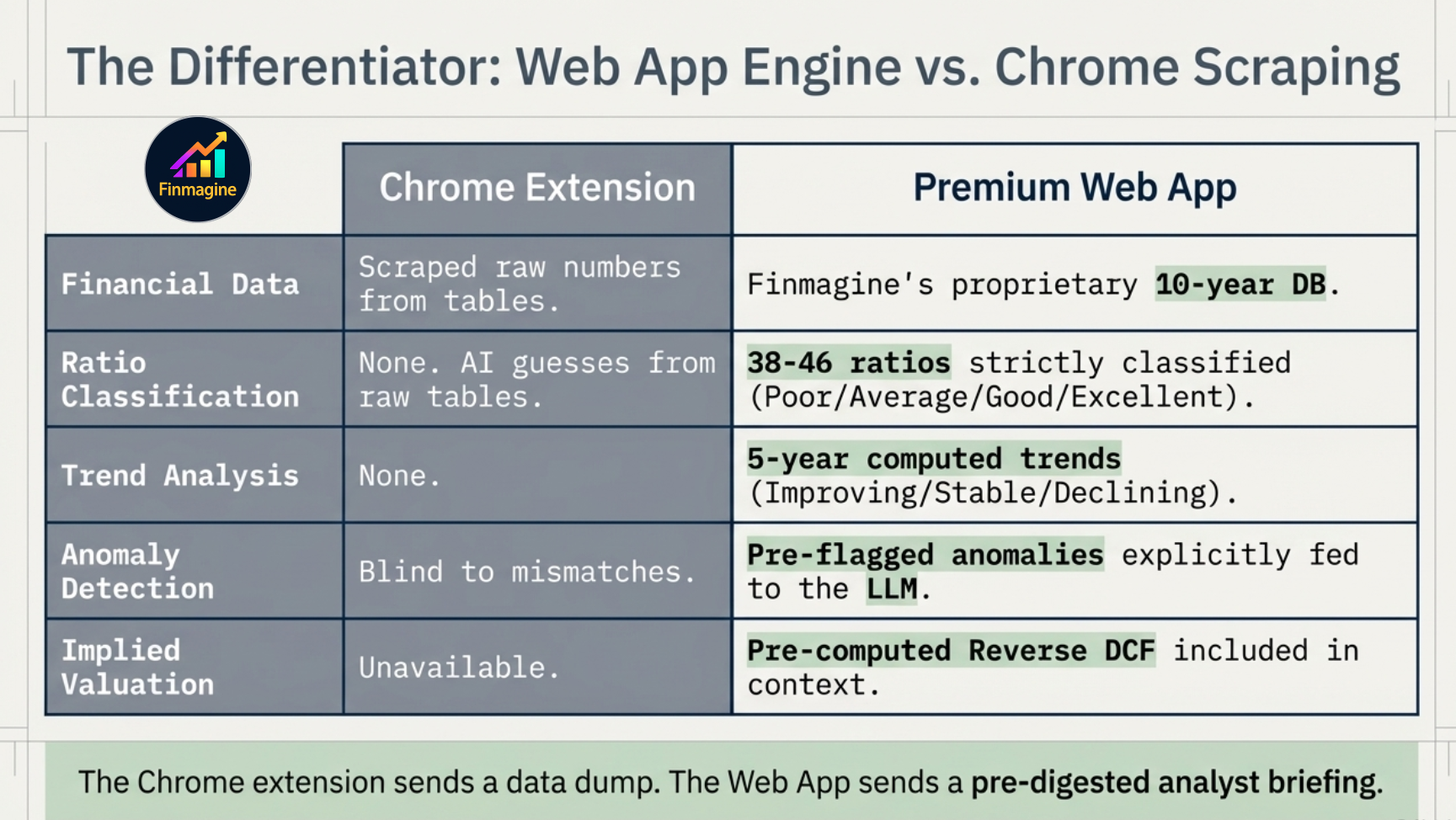
What the AI receives Chrome Extension (CWS) Premium Web App
Financial data source Scraped from Screener.in — raw numbers Finmagine's own 10-year DB — P&L, Balance Sheet, Cash Flow, Ratios
Ratio classification None — AI classifies from raw numbers 38–46 ratios pre-classified: Poor / Average / Good / Excellent
Trend analysis None — AI infers trends from tables 5-year trend computed per ratio: Improving / Stable / Declining
Anomaly detection None — AI must spot anomalies itself Pre-flagged: ROCE/ROE splits, liquidity vs profit mismatches, etc.
Reverse DCF Not available Computed from price vs DB financials — implied vs actual CAGR
Finmagine Rating Not available BUY / HOLD / AVOID signal included in context
Company documents Links from Screener.in Finmagine DB: concall URLs, annual reports, credit ratings
The Differentiator: Web App Engine vs Chrome Scraping — Financial Data (scraped raw vs 10-year DB), Ratio Classification (none vs 38-46 strictly classified), Trend Analysis (none vs 5-year computed), Anomaly Detection (blind vs pre-flagged), Implied Valuation (unavailable vs pre-computed Reverse DCF)
The Chrome extension sends a data dump. The Web App sends a pre-digested analyst briefing. Same templates — fundamentally different inputs to the AI.
Finmagine AI architecture — three layers: Data Layer (10-year DB), Intelligence Layer (ratio computation, classification, trend, anomaly detection), and dual output: Display Layer and Prompt Layer
The three-layer architecture — the Chrome extension only accesses the Prompt Layer with raw scraped data. The Premium Web App runs all three layers: Data → Intelligence → Prompt.

The practical consequence: the AI receives a pre-digested analyst briefing instead of a spreadsheet dump. It does not have to classify ratios — they are classified. It does not have to spot anomalies — they are flagged. It does not have to calculate valuation implied growth — it is computed. Every cycle of reasoning the AI would have spent on data processing is now spent on insight.

🔮 WHAT'S COMING EXCLUSIVELY TO PREMIUM WEB APP
  • Classification-level Screener — filter by ratio classification, not just raw numbers. "ROCE Excellent + D/E Good + OPM Improving" — no free tool does this at the classification level.
  • Analyst Panel (4 personas) — Quality Analyst, Safety Analyst, Value Analyst, and Growth Analyst each pre-loaded with the same classified ratio data but weighted differently. Four lenses on every stock, rendered on demand. A retail Bloomberg Terminal — the same company viewed through four distinct investment philosophies simultaneously.
  • Multi-period intelligence — not just the latest quarter, but ratio classification across 10 years. See whether "Excellent" ROCE is structural or a recent anomaly.

These features use the same Intelligence Layer already built for the AI Advisor — the classified ratio data, trend detection, and anomaly flags. The Premium Web App is the only place they land.

The Stage 2 → Growth Triggers Flow
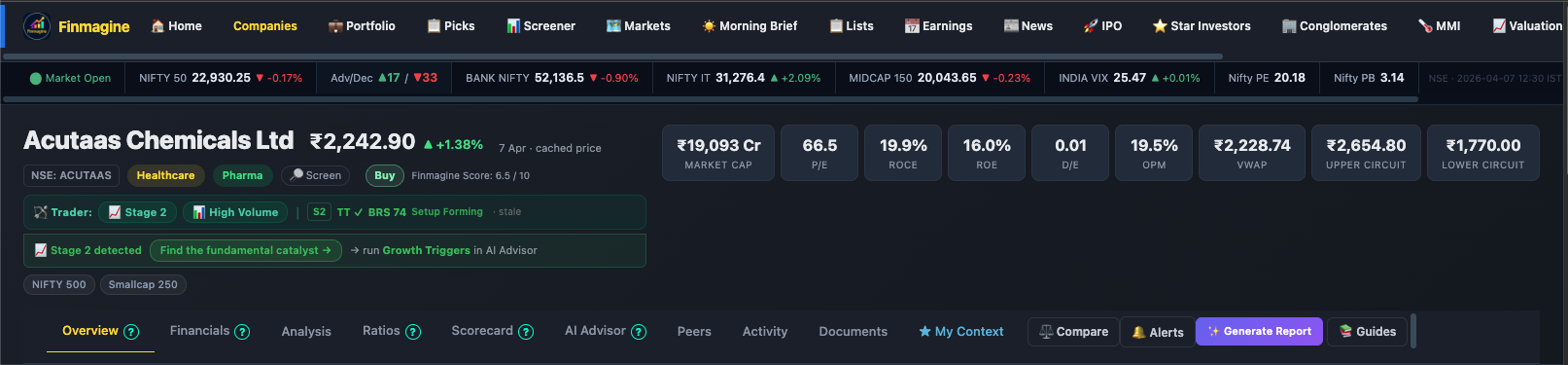
Finmagine stock page showing Trader ribbon — Stage 2, High Volume, BRS 74, Setup Forming — and the Stage 2 detected banner with Find the fundamental catalyst button linking to Growth Triggers in AI Advisor
The Trader ribbon (green bar) shows Stage 2 · High Volume · BRS 74 · Setup Forming. The banner below fires automatically: "Stage 2 detected → Find the fundamental catalyst → → run Growth Triggers in AI Advisor"

One of the most powerful cross-product integrations in Finmagine connects the Trader Chrome extension with the AI Advisor Web App. It bridges a technical signal (price action stage detection) with a fundamental research question (what is driving this setup?).
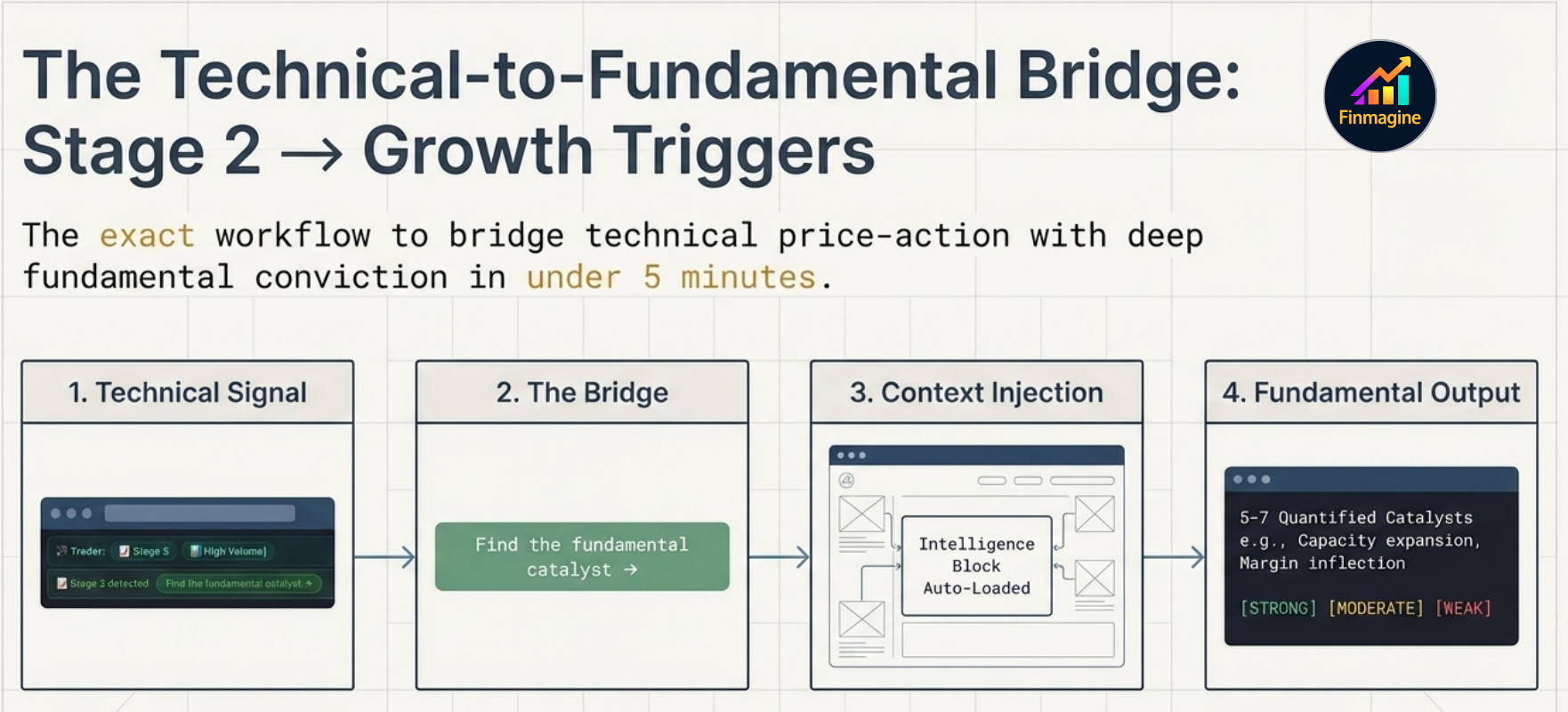
THE STAGE 2 → GROWTH TRIGGERS FLOW
1
You are browsing Screener.in with the Finmagine Trader extension active. It scans every stock in the table for Minervini Stage 2 price action.
2
A Stage 2 stock is detected. The Trader extension overlays a banner showing the Finmagine Rating (BUY / HOLD / AVOID) and the stock's key metrics.
3
The banner includes a "Find the fundamental catalyst →" button. The technical setup is confirmed — now you need to know why this stock might re-rate.
4
Clicking the button opens the Finmagine Web App for that stock with the AI Advisor tab active and Growth Triggers pre-selected. The Intelligence Block is already loaded with the company's classified ratio data.
5
You copy the Growth Triggers prompt (pre-loaded with context) and paste into Claude or Perplexity. Within minutes you have 5–7 quantified catalysts with conviction levels and timelines — the fundamental thesis behind the technical setup.
The Technical-to-Fundamental Bridge: Stage 2 → Growth Triggers — 4 steps: (1) Technical Signal from Trader, (2) The Bridge via 'Find the fundamental catalyst' button, (3) Context Injection with Intelligence Block auto-loaded, (4) Fundamental Output: 5-7 quantified catalysts with STRONG/MODERATE/WEAK conviction tags
The exact workflow — from a Stage 2 technical signal in Trader to 5–7 quantified fundamental catalysts in the AI Advisor, in under 5 minutes.

This is a complete research workflow in under 5 minutes: Trader surfaces the technical setup → AI Advisor explains the fundamental catalyst → you decide whether the thesis justifies the position. Neither product alone delivers this — it requires the integration.

Trader is a free Chrome extension. Install it from the Chrome Web Store. It works on Screener.in and requires no login. The Stage 2 detection and Finmagine Rating banner are available to all Trader users. The Growth Triggers integration requires a Finmagine Premium Web App subscription.

The 18 Templates — Complete Reference

Templates are organised below by purpose. Each entry shows what the template does, which AI platform delivers the best output, and — where a dedicated deep-dive tutorial exists — a link to the full guide.
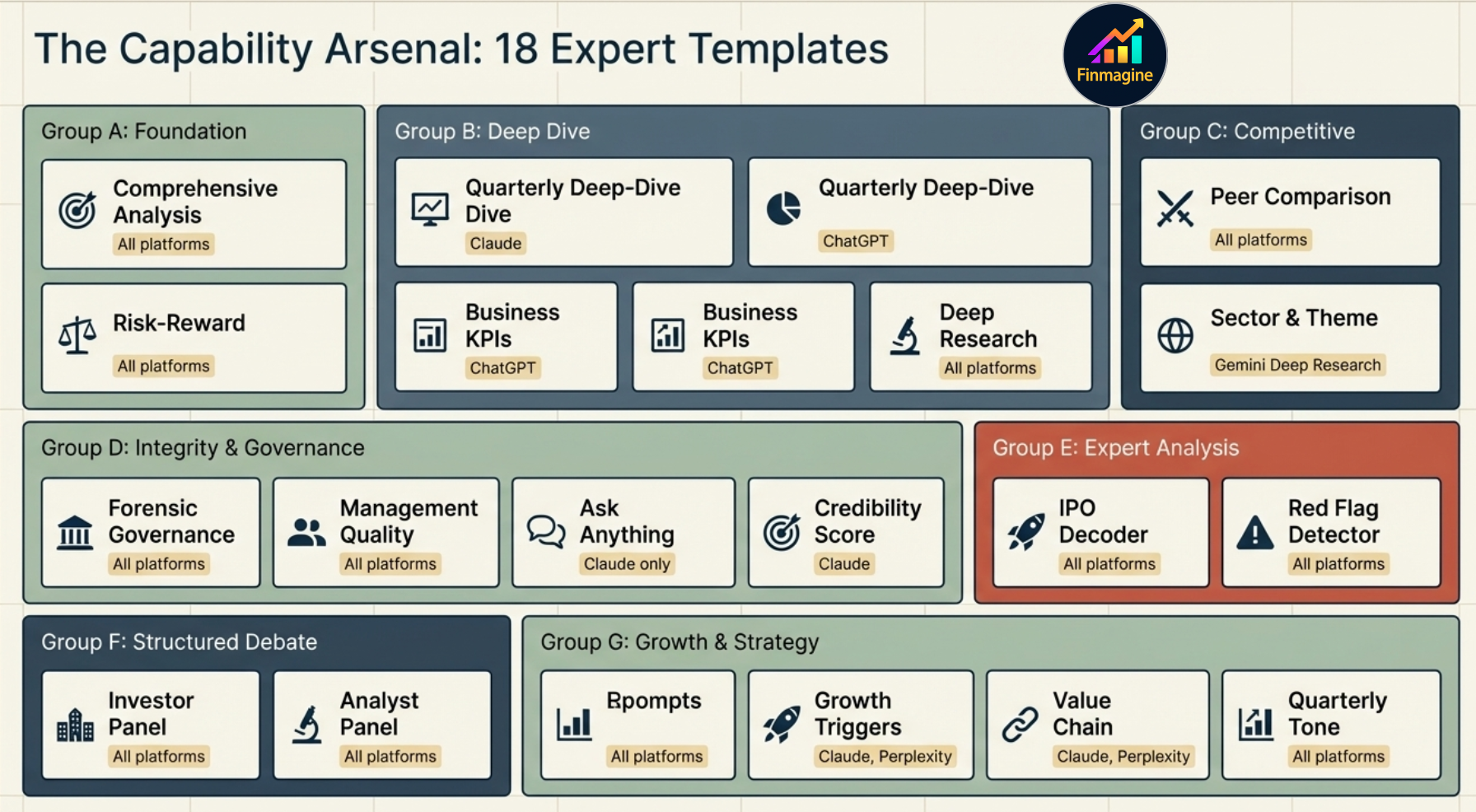
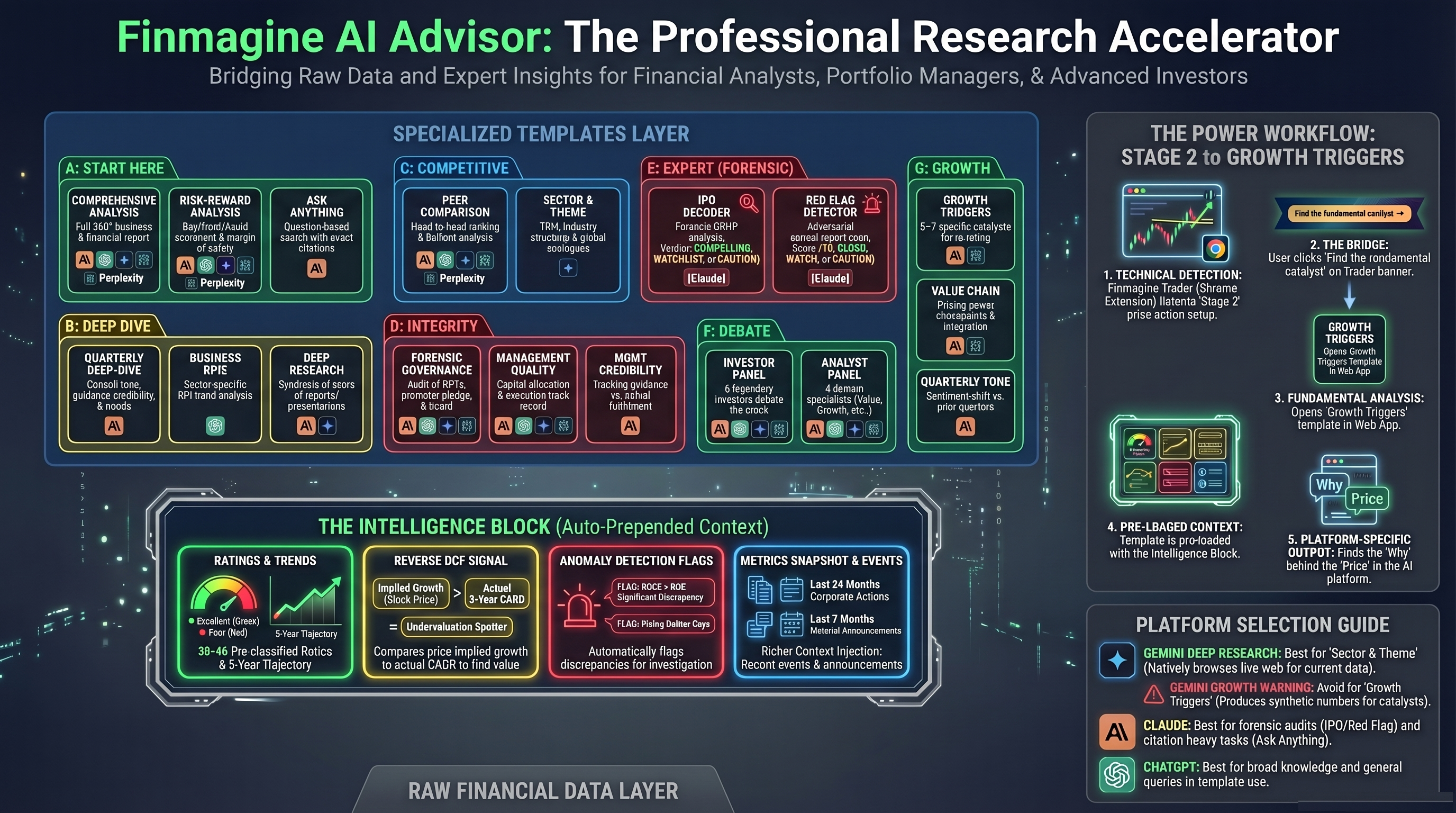
The Capability Arsenal: 18 Expert Templates — Groups A through G across Foundation, Deep Dive, Competitive, Integrity & Governance, Expert Analysis, Structured Debate, and Growth & Strategy
The complete 18-template arsenal — 7 groups covering every analytical angle from a first-pass foundation overview to forensic document analysis.
📋 Start Here — Foundation Analysis
🎯
Comprehensive Analysis
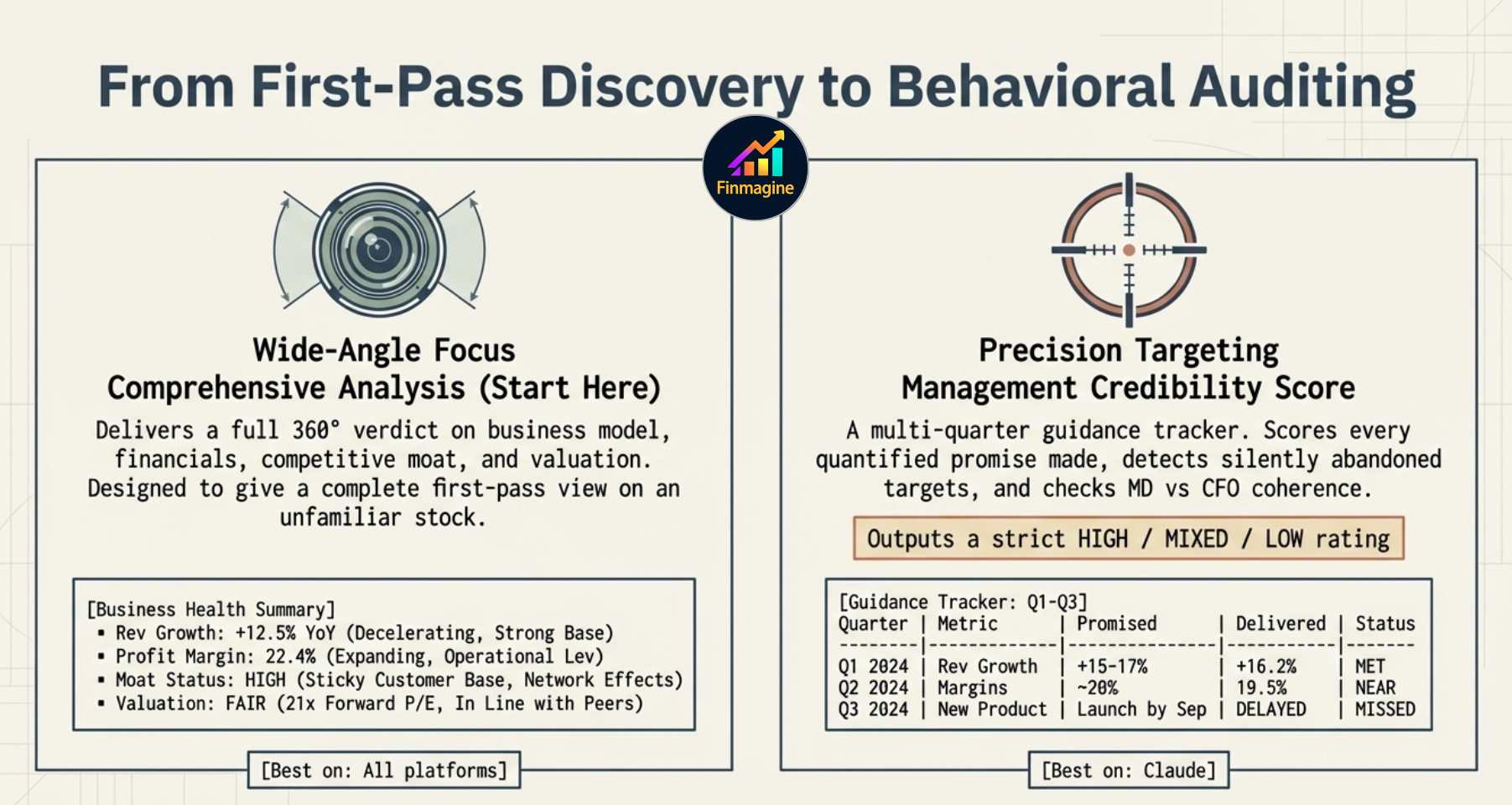
Full 360° analysis — business model, financials, competitive moat, valuation, and an overall verdict. The right template when you are researching a company for the first time or want a complete picture before deciding. Produces a structured report covering every material dimension.
All platforms
⚖️
Risk-Reward Analysis
Maps downside risks and upside potential, calculates an implied margin of safety, and produces a BUY / HOLD / AVOID scorecard. Use this when you already know the business and want a structured investment decision framework — not another overview.
All platforms
From First-Pass Discovery to Behavioral Auditing — Comprehensive Analysis (Wide-Angle Focus: full 360° verdict on business model, financials, competitive moat and valuation) vs Management Credibility Score (Precision Targeting: multi-quarter guidance tracker, detects silently abandoned targets, checks MD vs CFO coherence, outputs HIGH / MIXED / LOW rating)
Two ends of the spectrum — Comprehensive Analysis for wide-angle first-pass discovery, Management Credibility Score for surgical behavioural auditing of guidance vs delivery.
💬
Ask Anything
Type any question — the AI reads all linked concall transcripts and annual reports and returns FINDING blocks with exact citations and page/quarter references. Claude is the only platform that reliably follows the structured citation format. Other platforms read the documents but produce generic summaries without traceable citations.
Claude only
🔬 Deep Dive — Specific Analytical Angles
📊
Quarterly Deep-Dive
Evaluates the most recent concall for guidance credibility, tone signals, narrative drift vs prior quarters, trend analysis, and produces a mandatory structured scorecard. Best for post-results analysis — did management deliver on what they promised last quarter? Are they becoming more or less confident? Is the narrative shifting? Claude is recommended for the structured output format.
→ Deep-dive tutorial: Quarterly Analysis in AI Advisor
Claude
PREMIUM WEB APP vs CHROME EXTENSION — WHY IT MATTERS FOR THIS TEMPLATE

The Chrome extension copies raw tables from Screener.in and sends them to the AI. The Finmagine Premium Web App does something fundamentally different before the prompt even opens:

🔌 CHROME EXTENSION
  • Scrapes raw numbers from Screener.in
  • No ratio classification (no Poor / Good / Excellent)
  • No trend detection (improving vs declining)
  • No anomaly flags
  • LLM receives a data dump — interprets everything itself
🌐 PREMIUM WEB APP
  • 38–46 ratios computed from Finmagine's own 10-year DB
  • Every ratio classified: Poor / Average / Good / Excellent
  • 5-year trend per ratio: Improving / Stable / Declining
  • Anomalies auto-detected (e.g. ROCE >> ROE)
  • LLM receives a pre-digested analyst briefing — output is sharper

This Intelligence Block is auto-prepended to every template in the Premium Web App — the AI sees ratio health, trend trajectories, anomaly flags, and a Reverse DCF before it reads a single word of your prompt. Same template, dramatically better output.
📈
Business KPIs Deep Dive
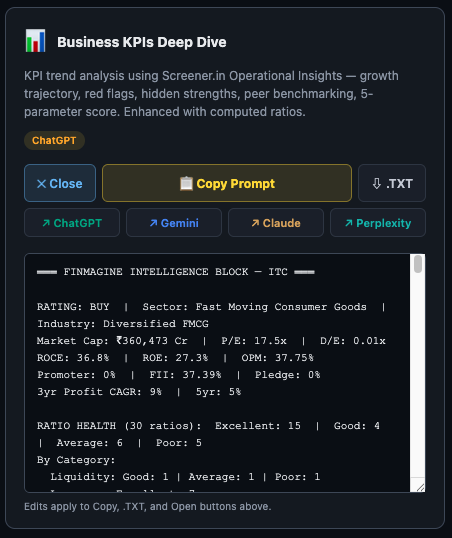
KPI trend analysis using Operational Insights data — growth trajectory, red flags, hidden strengths, peer benchmarking, and a 5-parameter score. Enhanced with the pre-computed ratio classifications from the Intelligence Block. Best for companies with rich sector-specific KPI data (Hotels, Hospitals, Pharma, IT). ChatGPT handles structured numerical analysis particularly well.
ChatGPT
🔭
Deep Research
Full due diligence — instructs the AI to read all linked concall transcripts, annual reports, and investor presentations for the company. This is the most document-intensive template. Use when you want the AI to synthesise across multiple years of management communication, not just the latest quarter. Works across all platforms; Claude and Gemini handle large document volumes best.
All platforms
🏆 Competitive Intelligence
⚔️
Peer Comparison
Head-to-head vs sector peers — ROCE, margins, DuPont decomposition, valuation bridge, and a competitive ranking. Uses the classified ratio data and peer percentile ranks already computed in the Intelligence Block, so the AI is comparing structured assessments rather than raw number tables. Best for understanding where this company sits in its competitive landscape.
All platforms
🌍
Sector & Theme Analysis
Industry structure, dominant investment theme, Total Addressable Market, policy tailwinds, historical cycle positioning, and global analogues — plus three mandatory structured outputs: Porter's Five Forces scored 1–10 (Indian context, with India-specific drivers per force), a Global Peer Porter Ranking (5–6 peers scored on the same five forces, sorted by composite), and a Competitive MOAT Deep-Dive (WIDE / NARROW / NO MOAT verdict with 2×2 Investment Implication Matrix). This template requires live web research — it is the only template that explicitly needs current data beyond the company's financials. Gemini Deep Research is by far the best platform here: it can browse the web natively and synthesise sector reports in real time. Perplexity also works well. Claude and ChatGPT are limited by their training cutoff for sector dynamics.
Gemini Deep Research
🏛️ Integrity & Governance
🔬
Forensic Governance
Related Party Transactions, promoter forensics, earnings integrity audit, CFO vs PAT divergence, and board quality assessment. Pairs naturally with the Forensics tab — use the Forensics tab for the quantitative signals (6 metrics, A–D grade), then use this template to get the AI's qualitative interpretation of the governance story across multiple years of filings.
All platforms
👔
Management Quality
Capital allocation history, governance track record, promoter behaviour, and execution consistency. Covers how management has actually deployed capital over time — not what they said they would do, but what the financial record shows. Complements the Scorecard's Management Quality dimension (which is ratio-based) with qualitative document evidence.
All platforms
🎯
Management Credibility Score
Multi-quarter guidance tracker — scores every quantified promise management made, detects silently abandoned targets, audits confidence language patterns, checks MD vs CFO statement coherence. Produces a HIGH / MIXED / LOW credibility verdict. One of the most powerful templates for detecting management that consistently over-promises and under-delivers. Claude recommended for the structured scoring framework.
→ Deep-dive tutorial: Management Credibility Archetypes
Claude
PREMIUM WEB APP vs CHROME EXTENSION — WHY IT MATTERS FOR THIS TEMPLATE

The Chrome extension copies raw tables from Screener.in and sends them to the AI. The Finmagine Premium Web App does something fundamentally different before the prompt even opens:

🔌 CHROME EXTENSION
  • Scrapes raw numbers from Screener.in
  • No ratio classification (no Poor / Good / Excellent)
  • No trend detection (improving vs declining)
  • No anomaly flags
  • LLM receives a data dump — interprets everything itself
🌐 PREMIUM WEB APP
  • 38–46 ratios computed from Finmagine's own 10-year DB
  • Every ratio classified: Poor / Average / Good / Excellent
  • 5-year trend per ratio: Improving / Stable / Declining
  • Anomalies auto-detected (e.g. ROCE >> ROE)
  • LLM receives a pre-digested analyst briefing — output is sharper

This Intelligence Block is auto-prepended to every template in the Premium Web App — the AI sees ratio health, trend trajectories, anomaly flags, and a Reverse DCF before it reads a single word of your prompt. Same template, dramatically better output.
🔍 Expert Analysis — Document Forensics
📋
IPO Decoder
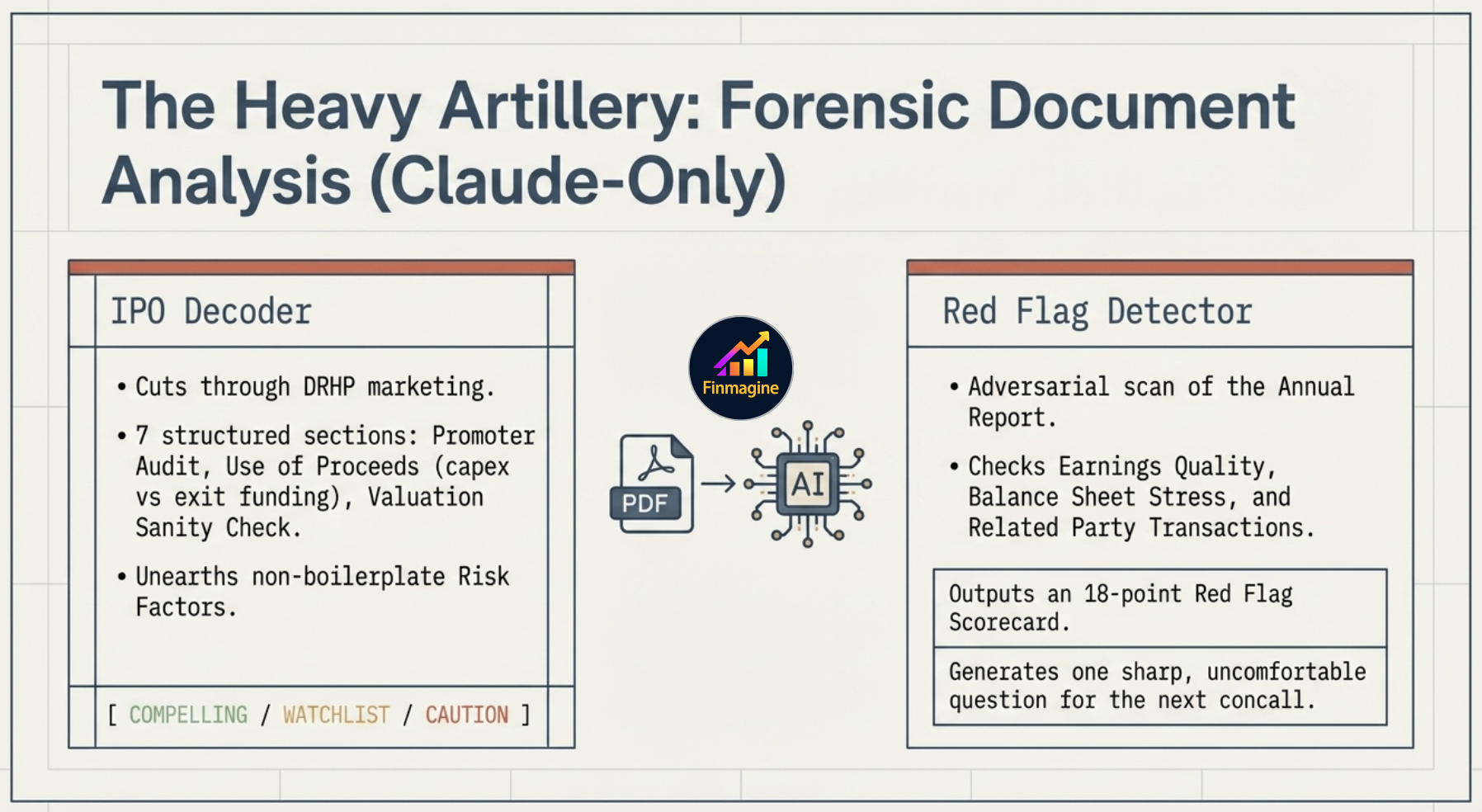
Forensic DRHP/RHP analysis for IPOs and recently listed companies. Cuts through the marketing language in prospectuses with 7 structured sections: Business Reality Check (promoter narrative vs actual financials), Financial Forensics (3-year pre-IPO table with window-dressing flags), Promoter & Management Audit (OFS%, salary, litigation), Use of Proceeds (growth capex vs promoter exit funding), Valuation Sanity Check (vs real named listed peers), Risk Factor Triage (company-specific risks only — no boilerplate), and IPO Verdict (COMPELLING / WATCHLIST / APPROACH WITH CAUTION). How to use: Download the DRHP/RHP PDF from SEBI EDGAR, NSE, or BSE and upload it to Claude before submitting the prompt — Claude cannot fetch external URLs.
Claude only
🚨
Red Flag Detector
Forensic annual report scan — adversarial by design, works for any company at any time. 7 sections: Earnings Quality Scan (other income%, revenue recognition policy, deferred tax trend), Balance Sheet Stress Test (3-year table: receivable days, goodwill, capital advances, loans to subsidiaries), Cash Flow Integrity (CFO/PAT for 3 years, FCF trend), Related Party Audit (entity names, amounts, CLEAN/CONCERNING flags), Auditor Signals (tenure, qualifications, emphasis of matter, key audit matters), Governance & Promoter Behaviour (pledging, salary%, subsidiaries, dilution history). Closes with a Red Flag Scorecard: N/18 flags found, overall 🟢 CLEAN / 🟡 WATCH / 🔴 CAUTION rating, the most critical finding, and one sharp question for the next concall.
Claude only
The Heavy Artillery: Forensic Document Analysis (Claude-Only) — IPO Decoder cuts through DRHP marketing with 7 structured sections and outputs COMPELLING / WATCHLIST / CAUTION verdict; Red Flag Detector adversarially scans the Annual Report for Earnings Quality, Balance Sheet Stress, and Related Party Transactions, outputting an 18-point Red Flag Scorecard
The two forensic templates — both Claude-only, both requiring document upload, both designed to surface what marketing language and accounting conventions try to hide.
PREMIUM WEB APP vs CHROME EXTENSION — WHY IT MATTERS FOR THIS TEMPLATE

The Chrome extension copies raw tables from Screener.in and sends them to the AI. The Finmagine Premium Web App does something fundamentally different before the prompt even opens:

🔌 CHROME EXTENSION
  • Scrapes raw numbers from Screener.in
  • No ratio classification (no Poor / Good / Excellent)
  • No trend detection (improving vs declining)
  • No anomaly flags
  • LLM receives a data dump — interprets everything itself
🌐 PREMIUM WEB APP
  • 38–46 ratios computed from Finmagine's own 10-year DB
  • Every ratio classified: Poor / Average / Good / Excellent
  • 5-year trend per ratio: Improving / Stable / Declining
  • Anomalies auto-detected (e.g. ROCE >> ROE)
  • LLM receives a pre-digested analyst briefing — output is sharper

This Intelligence Block is auto-prepended to every template in the Premium Web App — the AI sees ratio health, trend trajectories, anomaly flags, and a Reverse DCF before it reads a single word of your prompt. Same template, dramatically better output.

🎭 Structured Debate — Multi-Perspective Analysis
🏛️
Investor Panel
6 legendary investors debate the stock in 3 structured rounds — opening statements, live challenge and cross-examination, final verdicts. The template maps the consensus view and the sharpest point of disagreement. Use this when you want to stress-test your thesis against radically different investment philosophies simultaneously — value vs growth vs quality vs contrarian.
All platforms
🔬
Analyst Panel
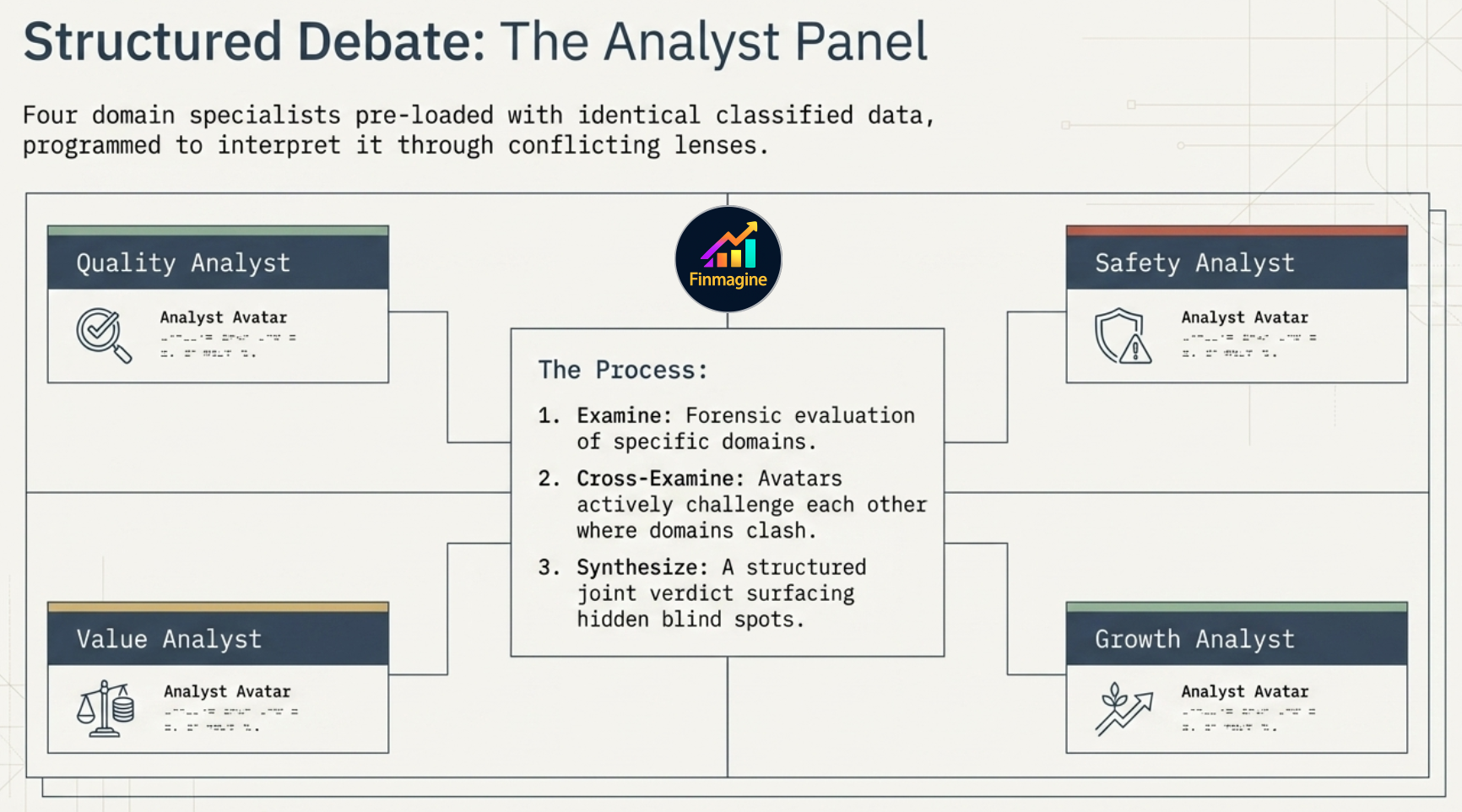
4 domain specialists — Quality Analyst, Safety Analyst, Value Analyst, and Growth Analyst — each forensically examine their slice of the company, cross-examine each other where their domains clash, then deliver a joint verdict. Unlike the Investor Panel (which simulates famous investors), the Analyst Panel is structured around the four dimensions of financial analysis — it's a disciplined decomposition, not a debate. The Intelligence Block makes this template especially effective: each analyst receives classified ratio data already sorted by their domain.
All platforms
Structured Debate: The Analyst Panel — four domain specialists (Quality Analyst, Safety Analyst, Value Analyst, Growth Analyst) each pre-loaded with identical classified data, programmed to interpret it through conflicting lenses: Examine → Cross-Examine → Synthesize
Four analyst avatars, identical data, conflicting lenses — the Analyst Panel surfaces blind spots that any single analytical perspective would miss.
🚀 Growth & Strategy
🚀
Growth Triggers
Identifies 5–7 specific catalysts for an earnings re-rating — each quantified with a magnitude estimate, conviction level (HIGH / MEDIUM / LOW), and timeline. Not generic sector tailwinds — specific triggers: a product launch, a regulatory approval, a capacity addition coming online, a margin inflection from input cost normalisation. This is the template linked from the Trader "Stage 2 detected" banner. Claude and Perplexity both work well; Claude for structured output, Perplexity for current catalyst data.
→ Deep-dive tutorial: Growth Triggers & Conviction Tags
Claude · Perplexity
PREMIUM WEB APP vs CHROME EXTENSION — WHY IT MATTERS FOR THIS TEMPLATE

The Chrome extension copies raw tables from Screener.in and sends them to the AI. The Finmagine Premium Web App does something fundamentally different before the prompt even opens:

🔌 CHROME EXTENSION
  • Scrapes raw numbers from Screener.in
  • No ratio classification (no Poor / Good / Excellent)
  • No trend detection (improving vs declining)
  • No anomaly flags
  • LLM receives a data dump — interprets everything itself
🌐 PREMIUM WEB APP
  • 38–46 ratios computed from Finmagine's own 10-year DB
  • Every ratio classified: Poor / Average / Good / Excellent
  • 5-year trend per ratio: Improving / Stable / Declining
  • Anomalies auto-detected (e.g. ROCE >> ROE)
  • LLM receives a pre-digested analyst briefing — output is sharper

This Intelligence Block is auto-prepended to every template in the Premium Web App — the AI sees ratio health, trend trajectories, anomaly flags, and a Reverse DCF before it reads a single word of your prompt. Same template, dramatically better output.

🔗
Value Chain Analysis
Maps the production chain, identifies pricing power chokepoints, assesses the company's vertical integration trajectory, and evaluates 10-year disruption exposure. Use this for manufacturing, commodity-adjacent, or supply-chain-intensive businesses where understanding where the company sits in the chain explains its margin structure better than any ratio does. Claude and Perplexity recommended for the combination of structured output and live supply chain data.
→ Deep-dive tutorial: Value Chain Analysis
Claude · Perplexity
PREMIUM WEB APP vs CHROME EXTENSION — WHY IT MATTERS FOR THIS TEMPLATE

The Chrome extension copies raw tables from Screener.in and sends them to the AI. The Finmagine Premium Web App does something fundamentally different before the prompt even opens:

🔌 CHROME EXTENSION
  • Scrapes raw numbers from Screener.in
  • No ratio classification (no Poor / Good / Excellent)
  • No trend detection (improving vs declining)
  • No anomaly flags
  • LLM receives a data dump — interprets everything itself
🌐 PREMIUM WEB APP
  • 38–46 ratios computed from Finmagine's own 10-year DB
  • Every ratio classified: Poor / Average / Good / Excellent
  • 5-year trend per ratio: Improving / Stable / Declining
  • Anomalies auto-detected (e.g. ROCE >> ROE)
  • LLM receives a pre-digested analyst briefing — output is sharper

This Intelligence Block is auto-prepended to every template in the Premium Web App — the AI sees ratio health, trend trajectories, anomaly flags, and a Reverse DCF before it reads a single word of your prompt. Same template, dramatically better output.

Platform Selection Guide

Not every AI platform handles every template equally. The best platform badge on each card is based on tested output — here's the full reasoning:

Platform Strengths Best templates Limitations
Claude Structured output, long document reading, citation formats, complex multi-section templates, forensic PDF analysis Ask Anything, Quarterly Deep-Dive, Management Credibility Score, Growth Triggers, Analyst Panel, IPO Decoder ★, Red Flag Detector ★ No live web access — knowledge cutoff applies for current sector data. IPO Decoder and Red Flag Detector require PDF upload.
Gemini Deep Research Live web browsing, large-scale synthesis, TAM research, policy data Sector & Theme Analysis (best platform), Deep Research Less structured output format; may not follow template sections as rigidly
Perplexity Current data (news, filings, recent events), good at catalyst research Growth Triggers, Value Chain Analysis, Sector & Theme Analysis Shorter context window; less suited to long structured templates
ChatGPT Strong at numerical tables, structured scoring, KPI analysis Business KPIs Deep Dive, Comprehensive Analysis, Risk-Reward Gemini fails on Growth Triggers (produces synthetic numbers) — avoid for templates needing verifiable data
The LLM Platform Compass: Routing the Right Prompt to the Right Brain — Claude (structured output, citations, forensics: Ask Anything / IPO Decoder / Red Flag Detector), Gemini Deep Research (live web browsing: Sector & Theme — Warning: fabricates synthetic numbers on Growth Triggers), Perplexity (live current data: Growth Triggers / Value Chain), ChatGPT (numerical tables and structured scoring: Business KPIs / Comprehensive / Risk-Reward)
Match the right cognitive engine to the right template — the platform badge on each card is based on tested output, not theoretical capability.
Gemini and Growth Triggers: Tested extensively — Gemini produces convincing-sounding but synthetic growth catalyst numbers for the Growth Triggers template. The quantified estimates are fabricated rather than derived from real company data. Use Claude or Perplexity for this template. This is not a limitation of Gemini generally — Sector & Theme Analysis (which needs live web research) is where Gemini excels.

Customising Templates with Edit Prompt
Edit Prompt view showing the full prompt text editable before copying
The Edit view — full prompt text is editable. Add sector context, specific questions, or sharpen the focus before copying.

Every template has an Edit button that opens the full prompt text in an editable view. You can modify it before copying. Common uses:

Edits are session-only. Modified prompts are not saved — each time you open the AI Advisor, templates reset to their default. If you find yourself making the same edit repeatedly, save your version as a text file using the .TXT download button on the unedited version, then modify offline.

Recommended Workflow

Not sure which templates to run? You don't need all 18 templates for every stock. Most users get 90% of the picture from 5. The AI Advisor has a built-in template guide — click the "Not sure which templates to run?" disclosure in the panel to see three curated combinations by use case.
AI Advisor collapsible template guide showing three curated combinations: Full due diligence (Comprehensive + Sector & Theme + Red Flag + Peer Comparison + Management Credibility), Quick conviction check (Risk-Reward + Growth Triggers + Forensic Governance), and New position sizing (Sector & Theme + Peer Comparison + Investor Panel)
Three curated template combinations — click the tip disclosure in the AI Advisor panel to see them.
Run all 18 only when doing institutional-grade deep research on a high-conviction position.

Step 1 Start with Comprehensive Analysis if you're new to a company. Read the output to build your mental model. Flag the two or three things the AI identifies as the most important risks or opportunities.

Step 2 Run Risk-Reward once you understand the business. This gives you the structured investment case — what needs to go right, what could go wrong, what margin of safety the current price implies.

Step 3 Use Quarterly Deep-Dive post-results — every quarter, after the concall, this is the fastest way to assess whether the management narrative is coherent, improving, or deteriorating.

Step 4 Run Management Credibility Score after 2–3 quarters of tracking. This is where the multi-quarter pattern becomes visible — not whether last quarter's guidance was met, but whether the organisation consistently delivers on what it promises.

Step 5 Use Growth Triggers before adding to a position — if the Scorecard and ratios look good, this template answers the last question: what specific event or inflection will cause the market to re-rate this stock? Without a trigger, a great business can stay sideways for years.

Step 6 Use Ask Anything for surgical questions — once you've built your thesis, use this to verify specific claims. "Did management mention the new plant capacity timeline in the last 3 concalls?" Claude will find the exact quote and quarter.
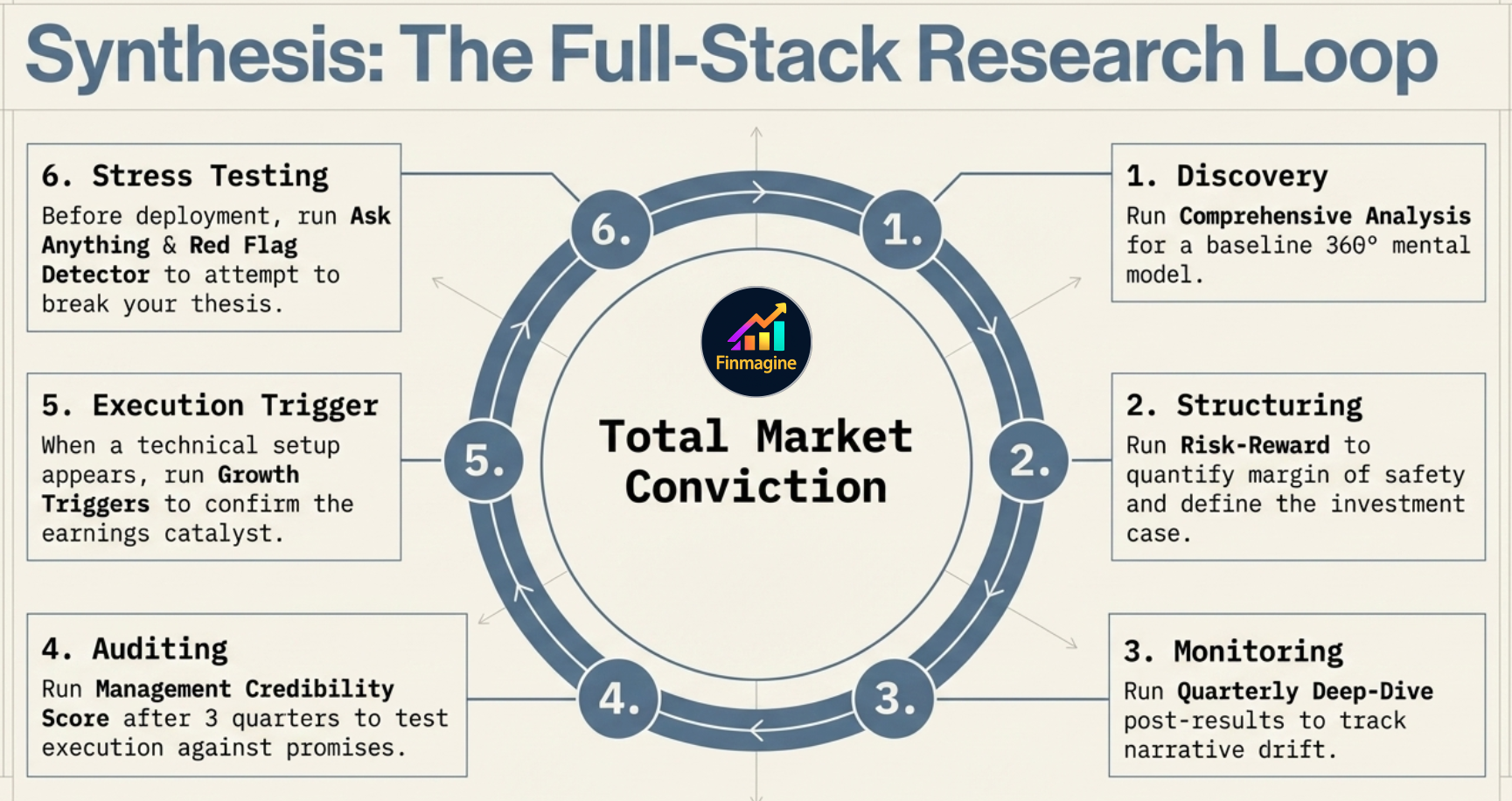
Synthesis: The Full-Stack Research Loop — 6 steps around Total Market Conviction: (1) Discovery: Comprehensive Analysis for baseline 360° mental model, (2) Structuring: Risk-Reward to quantify margin of safety, (3) Monitoring: Quarterly Deep-Dive post-results to track narrative drift, (4) Auditing: Management Credibility Score after 3 quarters, (5) Execution Trigger: Growth Triggers when a technical setup appears, (6) Stress Testing: Ask Anything & Red Flag Detector to attempt to break your thesis
The Full-Stack Research Loop — six templates working in sequence to build Total Market Conviction, from first discovery to stress-testing before deployment.
The Intelligence Block makes every step sharper. The workflow above covers all major research scenarios — the Intelligence Block is the invisible layer that makes the AI's responses specific to this company rather than generic to the sector.

Ready to Analyse Indian Stocks Like a Pro?

Finmagine gives you 30+ computed financial ratios, sector benchmarks, FII/DII flows, the Finmagine Score, and AI-powered analysis — all in one place.

Analyse a Stock → Create Free Account
← Companies Hub ← All Feature Guides