Following along? Open the live page
Finmagine — free to explore • premium for full access • no app needed
ⓘ The My Context tab is available to all logged-in users. Both the Watchlist Journal and My Holdings are part of your personal account — your notes and trade log are private to you.
1. What Is the My Context Tab?
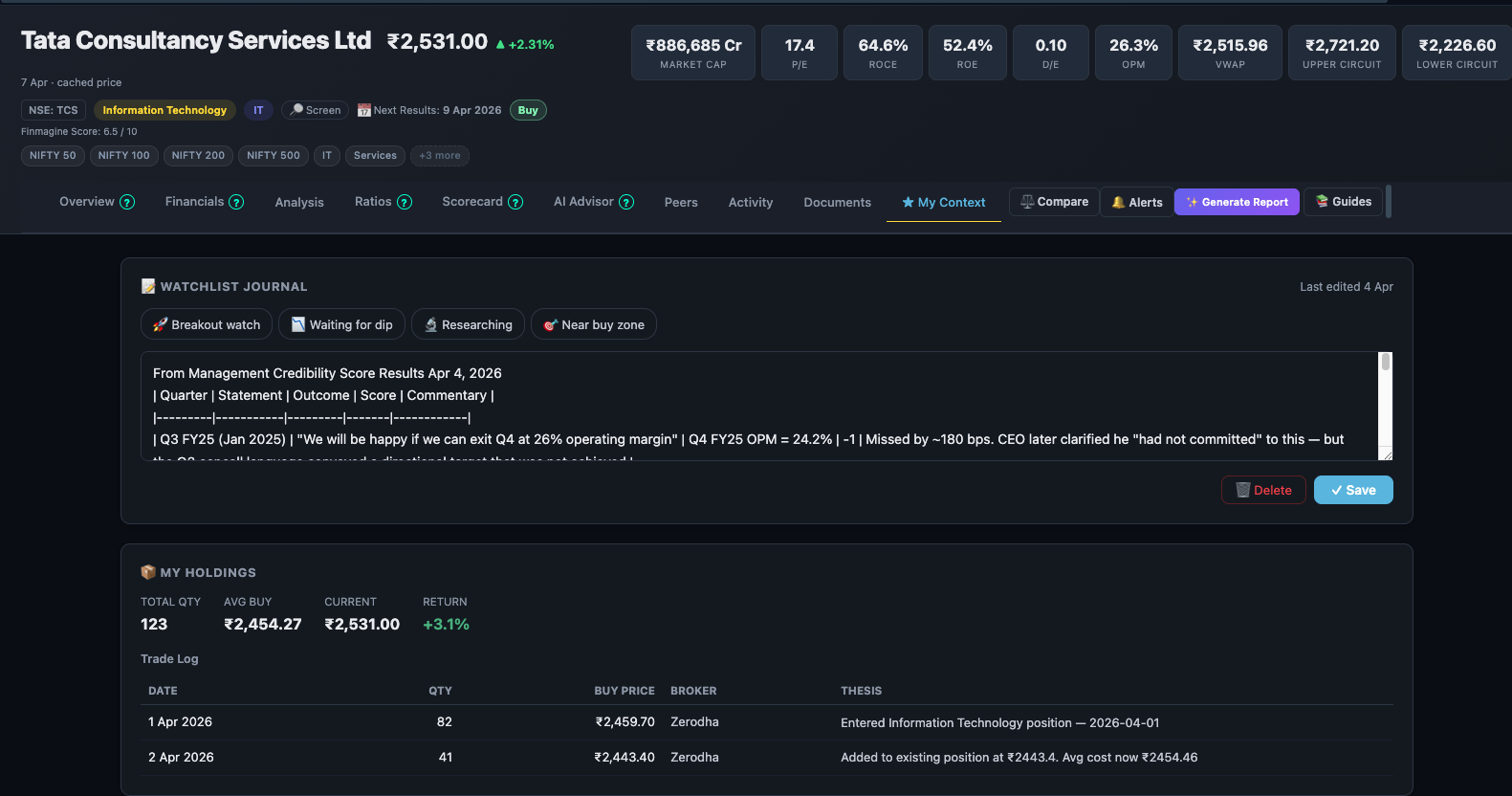
Every other tab on the Companies page is about the company. My Context is about you — your relationship with this stock, your investment thesis, what management told you and whether they delivered, and what you paid for your position.
It is your private research layer, attached permanently to the company page. Every time you return to TCS, or HDFC Bank, or any stock you follow, your notes and holdings are waiting for you — no spreadsheets, no separate apps, no context switching.
Two sections:
- Watchlist Journal — free-form notes and management statement tracking
- My Holdings — position size, average cost, live P&L, and trade log
2. Watchlist Journal
The Watchlist Journal is a private note pad attached to each company. Every entry is timestamped and persists in your account indefinitely. You can write anything — a thesis, a red flag you spotted, a question to investigate, or a direct quote from management that you want to verify later.
What you can see in the screenshot
The journal entry visible in Fig 1 is a management accountability note for TCS:
Q4 FY25 OPM = 28.2% | ✅ Missed by ~180 bps. CEO later clarified he "had not committed" to this... Missed
This entry was created during an AI Advisor Management Credibility analysis — the user copied the output and saved it as a journal note. The original management guidance ("exit Q4 at 26% OPM"), the actual result (28.2%), and the verdict are all in one place. Six months later, when the user is evaluating management credibility again, this record is waiting.
How to use the journal effectively
Use case 1 — Management statement tracking: After every concall, write a one-line note capturing specific, quantified guidance management gave. Then return after results and mark it as delivered or missed.
Use case 2 — Investment thesis: Write your core thesis when you first add a stock to your watchlist. This forces clarity, and revisiting it periodically tells you whether the story has changed.
Use case 3 — Red flags and questions: Note anything that makes you uncomfortable — a CFO departure, an auditor qualification, an unusual related-party transaction. These entries act as a checklist for the next time you review the company.
3. My Holdings
My Holdings lets you log your actual position in the stock. Once entered, Finmagine computes your live P&L using the current market price — so every time you open the company page, you see exactly where you stand.
What the holdings summary shows
From Fig 1, the holdings summary for TCS shows:
Finmagine computes the average buy price automatically across all trade entries in your log — you do not need to calculate it manually when you add a new tranche.
The trade log
Below the summary, every individual trade is logged. From Fig 1, the TCS trade log shows two entries:
| Date | Qty | Buy Price | Broker | Rationale Note |
|---|---|---|---|---|
| 2026-06-02 | 82 | ₹1,409.76 | Zerodha | Entered Information Technology position |
| 2 Apr 2026 | 41 | ₹3,643.42 | Zerodha | Added to existing position as year clarity on FY26 guidance |
Each entry records what you bought, at what price, through which broker, and — crucially — why. The rationale note is the most valuable field in the log.
Why the rationale note matters
Investment decisions feel obvious at the time. Six months later, they are opaque. Without a written rationale, you cannot distinguish between:
- A position you added because the thesis strengthened — and which you should hold
- A position you added on FOMO — and which you should exit when the stock recovers
- A position that was right for wrong reasons — which you should learn from regardless of P&L
One sentence per trade — "added on FY26 guidance clarity," "entered on 30% correction from 52W high," "averaging down after Q3 miss, thesis intact" — creates a process review trail that compounds in value over years.
4. Journal + Holdings — Using Both Together
The power of My Context is that both sections are on the same tab, attached to the same company page. Your research layer (journal) and your financial layer (holdings) live side by side.
- Before buying Write your thesis and key risks in the journal. Set a target entry price. Add a watch note: "Entry trigger: P/E below 25x or next management credibility miss."
- At purchase Add the trade to My Holdings — date, qty, price, broker, and rationale note. The journal and holdings are now aligned on why you bought and at what price.
- After each concall Return to the journal. Did management deliver on guidance? Write one line with the verdict. This builds your management credibility record quarter by quarter.
- Before adding more Read the full journal before adding to a position. Has the thesis evolved? Were there red flags you noted that you need to resolve first? The journal answers this without memory.
- Before selling Review the original thesis entry. If you are selling because the thesis is broken — good process. If you are selling because the stock fell — check whether you wrote anything in the journal that suggested the thesis was intact despite short-term pain.
Ready to Analyse Indian Stocks Like a Pro?
Finmagine gives you 30+ computed financial ratios, sector benchmarks, FII/DII flows, the Finmagine Score, and AI-powered analysis — all in one place.